Posted on

How Diagnostic Tools Help Workshops Save Time

Time matters in every automotive workshop. The faster a technician can understand a fault, confirm the cause and complete the repair, the better the workshop can manage bookings, reduce delays and support customers.

Modern diagnostic tools are designed to make that process more efficient. Instead of relying only on manual checks or basic code reading, workshops can use launch scan tools to scan vehicle systems, view live data, run active tests and complete service functions with more confidence.

For Australian workshops looking for a professional Launch Scanner, the real value is not just in reading codes. The value is in saving time across the whole diagnostic workflow.
Car Repair

Faster Fault Finding From the Start

When a vehicle arrives with a warning light or performance issue, the first challenge is knowing where to begin. Without a diagnostic scan, technicians may spend valuable time checking different systems without a clear direction.

A professional scan tool can quickly read diagnostic trouble codes from supported vehicle systems. This gives the technician a starting point and helps identify whether the fault is related to the engine, transmission, ABS, airbag, body control, steering, battery management or another control module.

This does not mean the scan tool gives the full answer immediately. Fault codes still need proper interpretation. But they help reduce the time spent searching blindly.

Full-System Scans Give a Clearer Vehicle Overview

Many modern vehicles have dozens of electronic control modules. A problem in one system can affect another, and a warning light may not tell the whole story.

This is where full-system scanning becomes useful. Instead of checking only the engine module, technicians can scan multiple systems and see a more complete fault picture.

For example, a drivability issue may also involve transmission data, ABS signals, throttle response, battery voltage or communication between modules. A full-system scan helps the workshop see these related faults earlier, which can save time during diagnosis.

Live Data Helps Confirm What Is Actually Happening

Live data is one of the most useful features in modern diagnostic tools. It allows technicians to view sensor readings and module information while the vehicle is running or being tested.

Instead of only seeing a stored fault code, the technician can check real-time values such as coolant temperature, oxygen sensor readings, fuel trims, throttle position, wheel speed, boost pressure, battery voltage or DPF data.

This helps confirm whether a sensor, actuator or system is behaving normally. For intermittent faults, live data can also help technicians identify issues that may not appear during a basic visual inspection.

Active Tests Reduce Guesswork

Many professional launch scan tools support active tests, also known as bi-directional control, depending on the vehicle and system coverage.

Active tests allow the scan tool to command selected components to operate. A technician may be able to activate a cooling fan, fuel pump, ABS component, electronic parking brake, actuator or other supported component directly from the scanner.

This can save time because the technician can confirm whether a component responds before removing parts or replacing anything unnecessarily. It also helps separate component faults from wiring, relay, power supply or control module issues.

Service Functions Make Routine Jobs Quicker

Many service tasks on newer vehicles require electronic reset or calibration procedures. A scan tool can help workshops complete these jobs without wasting time searching for separate tools or manual reset methods.

Common service functions may include oil reset, electronic parking brake service mode, battery registration, steering angle calibration, throttle adaptation, DPF-related functions, injector coding or TPMS-related service functions where supported.

For busy workshops, these functions can make routine servicing smoother and help technicians complete jobs in a more structured way.

Better Diagnostic Reports Improve Communication

Diagnostic tools can also save time after the scan is complete. Many workshops use pre-repair and post-repair reports to record what was found, what was cleared and whether faults returned after the repair.

This is helpful for technicians, service advisors and customers. Instead of explaining everything from memory, the workshop can use a report to support the repair recommendation or confirm the final result.

For fleet work, used vehicle inspections or repeat customer repairs, diagnostic reports can also create a clearer record of vehicle condition over time.

Why Launch Australia Support Matters

Saving time is not only about the tool itself. It is also about software updates, vehicle coverage, product resources and local support.

Workshops using LAUNCH diagnostic equipment can refer to the Launch Tech Australia Support page for software update guides, troubleshooting information and product resources. This helps reduce time spent dealing with update problems, setup questions or basic support issues.

For workshops searching for Launch Australia support, local product advice can also make it easier to choose a scanner that suits the vehicles and jobs coming through the workshop.
Diagnostic Tools Work Best With Repair Information

A scan tool helps identify what the vehicle is reporting, but technicians still need accurate repair information to complete the job properly.

The Australian Automotive Service and Repair Authority provides Australian repairers with access pathways for manufacturer service and repair information. When scan data is combined with correct procedures, wiring diagrams and specifications, workshops can diagnose faults more efficiently.

This combination helps reduce repeat checks, wrong repair paths and unnecessary part replacement.

Training Also Saves Time

A good scan tool is most effective when technicians know how to use it properly. Features such as live data, active tests, topology mapping, coding and guided functions can save time, but only when used with a clear diagnostic process.

The Australian Automotive Aftermarket Association is a useful industry resource for workshop training, aftermarket updates and technical development.

For modern workshops, investing in both diagnostic equipment and technician knowledge is one of the best ways to improve efficiency.

Where Diagnostic Tools Save the Most Time

Workshop Situation How Diagnostic Tools Help
Warning light diagnosis Quickly identifies stored fault codes and affected systems
Intermittent faults Uses live data to monitor sensor and module behaviour
Electrical component testing Uses active tests to command supported components
Routine servicing Completes resets, adaptations and maintenance functions
Post-repair checks Confirms whether codes return after repair
Customer communication Provides reports to explain findings and repair results
Fleet maintenance Supports faster checks and clearer service records

Choosing the Right Diagnostic Tool for Workshop Efficiency

Not every workshop needs the same diagnostic tool. A general mechanical workshop may prioritise full-system scanning, service functions and broad vehicle coverage. A European specialist may need coding, DoIP, CAN FD and advanced diagnostic capability. A fleet or diesel workshop may need heavy-duty coverage and 12V/24V support.

Before choosing a diagnostic scanner, workshops should consider the vehicle brands they service most often, the systems they need to access, the service functions they use every day and whether they need future support for EV, ADAS or heavy-duty applications.

The best diagnostic tool is not always the most expensive one. It is the one that matches the workshop’s real jobs and helps technicians complete those jobs more efficiently.
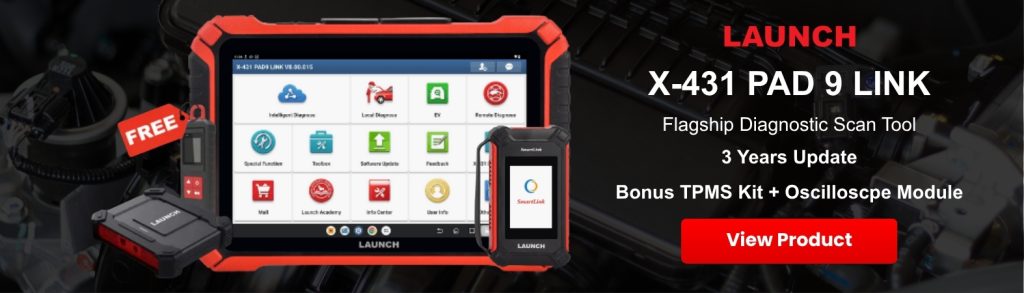
Pad 9 Link Flagship Scan Tool

Final Thoughts

Diagnostic tools help workshops save time by making fault finding faster, more structured and easier to verify. They allow technicians to read fault codes, scan full systems, view live data, run active tests, complete service functions and produce clearer repair reports.

For Australian workshops, launch scan tools can help reduce guesswork, improve workflow and support more confident repairs on modern vehicles.

If your workshop is comparing diagnostic tools, contact the Launch Tech Australia team for product advice, vehicle coverage questions and local support options.
Posted on

Right to Repair in Australia: What It Means for Workshops

a man is fixing a car

Right to Repair has become an important topic for Australian workshops. As vehicles become more software-driven, independent repairers need more than mechanical skill. They also need access to service information, diagnostic data, repair procedures and the right diagnostic equipment.

For independent workshops, the issue is simple: if a vehicle cannot be diagnosed properly, it cannot be repaired efficiently. That is why the combination of repair information and a professional Launch Scanner is becoming more important for modern workshop diagnostics.

This guide explains what Right to Repair means in Australia, how it affects independent workshops and why scan tools play a key role in making repair access practical.

What Is Right to Repair in Australia?

In the automotive industry, Right to Repair refers to the ability of independent repairers to access the information they need to diagnose, service and repair vehicles.

In Australia, this is connected to the Motor Vehicle Service and Repair Information Sharing Scheme. The ACCC Motor Vehicle Information Scheme explains how the scheme supports access to technical information for service and repair work.

This matters because modern vehicles rely heavily on electronic control modules, diagnostic software, service procedures and manufacturer data. Without access to the correct information, even an experienced technician may not be able to complete certain repairs properly.

a man is fixing a car

Why Right to Repair Matters for Independent Workshops

Independent workshops play a major role in Australia’s automotive service and repair market. Customers rely on local mechanics for servicing, maintenance, diagnostics and repairs across many vehicle brands.

Right to Repair helps protect that choice by supporting fairer access to service and repair information. This can help workshops diagnose faults more accurately, access manufacturer procedures, reduce unnecessary part replacement and compete more fairly with dealer workshops.

However, information alone is not enough. Workshops also need the right equipment to communicate with the vehicle and apply that information in real workshop conditions.

Repair Information and Diagnostic Tools Work Together

A common mistake is thinking that Right to Repair only means having access to service manuals. In practice, a workshop needs both information and diagnostic capability.

Repair information may tell the technician what the procedure is. A diagnostic scan tool helps the technician communicate with the vehicle, read fault codes, view live data, run active tests and confirm whether the repair has worked.

For example, a manufacturer procedure may explain how to diagnose a fault in an electronic parking brake system. But the workshop may still need a scan tool to read the module, run a service function, reset the system or confirm live data response.

What Workshops May Need Access To

Depending on the vehicle and job, independent workshops may need access to diagnostic trouble code definitions, wiring diagrams, service procedures, technical service bulletins, module locations, calibration procedures and software-related repair information.

The Australian Automotive Service and Repair Authority provides access pathways for manufacturer service and repair information, including information that independent repairers may need for modern vehicle servicing and diagnosis.

Some jobs may only require a basic scan and service reset. Other jobs may involve coding, programming, ADAS calibration, EV system diagnosis, immobiliser procedures or network communication faults.

The Role of Diagnostic Scanners in Modern Workshops

A professional diagnostic scanner allows technicians to communicate with the vehicle’s electronic systems. Depending on the model and vehicle coverage, this can include engine, transmission, ABS, airbag, body control, steering, battery management, ADAS-related systems and other control modules.

For independent workshops, scan tools can support daily diagnostic work such as full-system vehicle scans, reading and clearing fault codes, viewing live data, running bi-directional control, performing service resets and generating diagnostic reports.

These functions help turn repair information into practical workshop action. A wiring diagram, service bulletin or manufacturer procedure becomes much more useful when the technician can also test components, check data and confirm system response through the scanner.

Why Vehicle Coverage Is Important

Australian workshops often service many vehicle makes in the same week. A single workshop may see Toyota, Mazda, Ford, Hyundai, Kia, Volkswagen, BMW, Mercedes-Benz, Isuzu, Mitsubishi, Nissan and other brands regularly.

Because of this, vehicle coverage is one of the most important factors when choosing a diagnostic tool. A scanner should support the brands, systems and functions that match the workshop’s actual customer base.

Good diagnostic coverage can help workshops handle passenger vehicle diagnostics, European vehicle systems, light commercial vehicles, service functions, CAN FD and DoIP communication, EV diagnosis and ADAS-related work where supported.

Right to Repair Does Not Mean Every Repair Is Simple

Right to Repair improves access to information, but it does not mean every workshop can perform every possible repair on every vehicle without training, equipment or authorisation.

Some procedures may still require technician training, special tools, security access, manufacturer subscriptions, correct diagnostic software, battery support equipment and safe work procedures.

The Australian Treasury Motor Vehicle Service and Repair Information Sharing Scheme factsheets provide useful background on how the scheme supports competition and access to repair information in the automotive sector.

This is especially relevant for high-voltage EV systems, ADAS calibration, module programming, immobiliser work and safety-related systems.

How This Affects Scan Tool Choices

Right to Repair makes diagnostic capability more valuable, not less. As more information becomes accessible, workshops need tools that help them apply that information properly.

When choosing a scan tool, workshops should consider vehicle coverage, full-system diagnostic capability, live data, active tests, service reset functions, coding support, CAN FD and DoIP support, software updates and local technical support.

Workshops can also use the Launch Tech Australia Support page for software update guides, troubleshooting information and product resources related to LAUNCH diagnostic equipment.

Right to Repair and Customer Trust

Customers often choose independent workshops because they trust their local mechanic. Right to Repair supports that relationship by helping independent repairers access the information needed to service and repair vehicles properly.

When a workshop can diagnose faults clearly, explain findings and confirm repairs with scan reports, it creates a more professional customer experience.

This is especially useful when dealing with electronic faults, intermittent warning lights, service resets, post-repair checks and complex module-related issues.

Industry Background and Legislation

The Australian Parliament summary of the Motor Vehicle Service and Repair Information Sharing Scheme Bill outlines the establishment of the scheme within the Competition and Consumer Act framework.

For workshops, the practical takeaway is that vehicle repair is becoming more data-driven. Access to information matters, but so does the ability to use that information through the correct diagnostic tools and procedures.

Final Thoughts

Right to Repair in Australia is important because it gives independent workshops better access to the information needed to service and repair modern vehicles. But access to information is only part of the picture.

To use that information effectively, workshops also need suitable diagnostic equipment, vehicle coverage, software updates, training and local support.

A professional scan tool helps bridge the gap between repair information and real workshop diagnosis. It allows technicians to scan systems, read data, run tests, perform service functions and confirm repairs across supported vehicles.

For independent workshops, the future of repair is not just mechanical. It is diagnostic, data-driven and increasingly software-connected. Choosing the right scan tool is one of the practical steps workshops can take to stay competitive in that environment.

If your workshop is comparing diagnostic tools, contact the Launch Tech Australia team for product advice, coverage questions and local support.

Posted on

CAN FD and DoIP Explained for Australian Workshops

car engine

Modern vehicles contain more control modules, sensors and connected systems than ever before. As the amount of data moving through a vehicle increases, diagnostic tools must be able to communicate using newer and faster protocols.

Two terms that now appear regularly in scan tool specifications are CAN FD and DoIP. Both are used for vehicle communication, but they work differently and solve different problems.

For Australian workshops servicing newer passenger cars, European vehicles, commercial vehicles and increasingly complex electronic systems, understanding these protocols can help when choosing a professional diagnostic scanner. Many LAUNCH scan tools in Australia now support CAN FD, DoIP or both, depending on the model, VCI and required accessories.

car engine

What Is CAN FD?

CAN FD stands for Controller Area Network with Flexible Data-rate. It is an extension of the traditional CAN communication system that has been widely used in vehicles for many years.

Traditional CAN allows control modules to exchange small packets of information reliably. However, newer vehicles generate and process much more data, so the original CAN format can become a limitation.

According to the official Bosch CAN FD technical overview, CAN FD increases the maximum data carried in one frame from 8 bytes to 64 bytes. It can also switch to a higher bit rate during the data section of the message.

In practical workshop terms, CAN FD allows compatible vehicle modules and diagnostic equipment to exchange more information efficiently while retaining many of the familiar characteristics of a CAN network.

Why Do Newer Vehicles Use CAN FD?

Vehicle networks now need to support systems such as advanced driver assistance, powertrain management, battery systems, digital instrument displays, body control functions and connected safety features.

These systems may exchange more data than older vehicle electronics. CAN FD helps manufacturers manage that increased communication demand without replacing the entire CAN-based architecture.

For a workshop, CAN FD support matters because a scanner that only supports traditional CAN may not be able to communicate correctly with every module on a newer CAN FD-equipped vehicle.

A compatible CAN FD scan tool may be required for:

  • Accessing supported control modules on newer vehicles
  • Completing full-system diagnostic scans
  • Reading and clearing manufacturer-specific fault codes
  • Viewing live data from compatible systems
  • Running active tests and service functions
  • Performing coding or programming procedures where supported

CAN FD support does not automatically mean that every function will be available on every vehicle. Coverage still depends on the vehicle make, model, year, control module and diagnostic software.

What Is DoIP?

DoIP refers to diagnostic communication over Internet Protocol. It allows diagnostic information to travel using IP-based networking, commonly over automotive Ethernet.

The word “Internet” can be misleading. DoIP does not mean that a vehicle must be connected to the public internet for diagnosis. It means the diagnostic communication uses the same underlying Internet Protocol technology found in computer networks.

The official ISO 13400-2 DoIP standard defines communication between diagnostic test equipment and vehicle systems using IP, TCP and UDP. It also covers areas such as discovering a vehicle on the network, establishing a connection and routing diagnostic data through the vehicle gateway.

DoIP can provide a higher-capacity communication path for operations that involve larger amounts of diagnostic data.

Why Is DoIP Important for Workshops?

As vehicle software becomes more complex, workshops may need to transfer larger files or communicate with multiple modules during diagnosis and repair.

DoIP can be useful for supported tasks such as:

  • Fast full-vehicle scanning
  • Communicating with Ethernet-based vehicle gateways
  • Transferring larger diagnostic data sets
  • ECU coding or software operations where supported
  • Working with newer vehicle electrical architectures
  • Accessing modules that require a DoIP connection

The AUTOSAR Diagnostic over IP specification describes how DoIP is integrated into standardised automotive software architecture. This reflects the growing role of Ethernet and IP-based communication in modern vehicles.

DoIP does not necessarily replace CAN or CAN FD. A vehicle may use DoIP to communicate with a central gateway, while individual systems behind that gateway continue to communicate through CAN-based networks.

CAN FD vs DoIP: What Is the Difference?

Feature CAN FD DoIP
Full name Controller Area Network with Flexible Data-rate Diagnostic communication over Internet Protocol
Network type Enhanced CAN-based vehicle network IP-based communication, commonly over automotive Ethernet
Main purpose Carry more data at a faster rate than traditional CAN Provide a high-capacity path for vehicle diagnostics
Typical workshop relevance Accessing modules and diagnostic functions on CAN FD-equipped vehicles Fast scanning, gateway communication and data-intensive diagnostic procedures
Tool requirement CAN FD-compatible VCI and software DoIP-compatible VCI, software and sometimes a separate cable

The two protocols are not competitors. A professional diagnostic tool may need to support both because different vehicles and systems use different communication methods.

Does Every Workshop Need CAN FD and DoIP?

Not every workshop needs these protocols for every job. A workshop mainly servicing older vehicles may still complete most daily work using traditional CAN and OBD2 communication.

However, CAN FD and DoIP support becomes increasingly relevant when a workshop:

  • Regularly services newer passenger vehicles
  • Works on late-model European vehicles
  • Performs full-system diagnostics rather than basic engine code reading
  • Handles ECU coding, programming or module replacement
  • Wants to expand into newer diagnostic work
  • Needs a scan tool that will remain useful as vehicle technology develops

If a vehicle requires a protocol that the scanner or VCI does not support, some modules may be unavailable or certain functions may not operate correctly.

What Does a Workshop Need to Use These Protocols?

Protocol support involves more than the diagnostic tablet itself. The complete setup may include:

  • A compatible diagnostic scanner
  • A VCI that supports CAN FD or DoIP
  • Current diagnostic software
  • The correct vehicle cable or adapter
  • A stable wired or wireless connection
  • A suitable battery support unit for coding or programming work

Some scanners include direct DoIP capability through their supplied VCI, while other models require an additional DoIP cable. Workshops should check the complete product package rather than assuming that every function is built into the tablet.

LAUNCH Scan Tools With CAN FD and DoIP Support

Launch Tech Australia offers several workshop diagnostic tools that support these newer communication protocols.

AUSCAN 4 diagnostic scanner uses the DBSCar VII VCI, which supports CAN, CAN FD and DoIP. An additional cable is required for DoIP communication. It is suited to general workshops that need broad passenger vehicle coverage, full-system diagnosis and room to expand into additional software.

X-431 PRO SE is an accessible professional option for workshops moving beyond basic fault-code diagnosis. Its VCI supports CAN and CAN FD, with an additional cable required for DoIP.

X-431 PAD5 Link supports CAN, CAN FD and DoIP through its Smartlink VCI. It is designed for workshops that need broader vehicle coverage, topology mapping, advanced diagnostics, coding and optional light, medium and heavy-duty capability.

X-431 PAD9 Link supports CAN, CAN FD, DoIP and J2534. It also offers multi-channel high-speed scanning, topology mapping and advanced coding and programming functions, making it suitable for busy workshops and diagnostic specialists.

X-431 EURO TAB III uses a Smartlink C VCI that supports CAN FD, DoIP, J2534, D-PDU and RP1210. It is particularly relevant to workshops handling advanced European diagnostics, programming and wider professional diagnostic work.

Launch Tech PAD 9 Link

What to Check Before Buying a CAN FD or DoIP Scan Tool

When comparing diagnostic equipment, look beyond a simple protocol logo on the product page.

Check whether:

  • The supplied VCI supports the required protocol
  • A separate DoIP cable or adapter is needed
  • The vehicle brands you service are covered
  • The required diagnostic functions are available for those vehicles
  • Software updates are current
  • Coding or programming requires additional subscriptions
  • Local technical support is available

A scanner may support CAN FD or DoIP at the hardware level, but actual diagnostic access still depends on the vehicle software and manufacturer implementation.

Why These Protocols Matter for the Future of Workshop Diagnostics

Vehicle diagnosis is moving beyond simple code reading. Workshops increasingly need to work with network gateways, larger data streams, advanced driver assistance systems, electronic module replacement and software-based vehicle functions.

CAN FD helps improve communication within CAN-based vehicle networks, while DoIP provides an IP-based route for faster and more data-intensive diagnostic communication. Supporting both gives a workshop better access to the electronic systems used across newer vehicle platforms.

This does not mean every workshop must immediately replace its existing diagnostic equipment. It does mean that CAN FD and DoIP should be considered when purchasing the next professional scan tool, especially if the workshop expects to service newer vehicles over the coming years.

Final Thoughts

CAN FD and DoIP are two important automotive communication technologies, but they serve different purposes.

CAN FD extends traditional CAN communication by allowing larger data payloads and a faster data phase. DoIP uses IP-based networking to create a higher-capacity diagnostic communication path, commonly through automotive Ethernet.

For Australian workshops, the practical question is not which protocol is better. It is whether the diagnostic scanner, VCI, software and cables support the vehicles entering the workshop.

Before choosing a scanner, review the vehicle coverage and protocol requirements carefully. You can also use the Launch Tech Australia support resources or speak with the team through the online enquiry page for product and compatibility advice.

Posted on

What Is Bi-Directional Control in a Scan Tool?

Car Repair

Bi-directional control is one of the most useful functions in a professional automotive scan tool. It allows a diagnostic scanner to send commands to a vehicle system, not just read information from it.

In simple terms, a basic scan tool can listen to the vehicle. A scan tool with bi-directional control can also talk back to the vehicle.

For Australian workshops, this function can make diagnostics faster and more accurate. Instead of only reading a fault code and guessing what might be wrong, technicians can use active tests to command certain components, observe the response and confirm whether a system is working as expected.

Many professional LAUNCH scan tools Australia support bi-directional control, also known as active tests, depending on the vehicle, system and software coverage.

What Does Bi-Directional Control Mean?

Bi-directional control means two-way communication between the scan tool and the vehicle’s control modules.

With normal diagnostics, the scanner receives information from the vehicle. This may include diagnostic trouble codes, live data, freeze frame data or module status. With bi-directional control, the scanner can also send a command to the vehicle module and ask it to perform a specific action.

For example, a technician may use the scan tool to command a cooling fan to turn on, activate a fuel pump relay, cycle an ABS pump, operate an EGR valve, trigger an EVAP purge solenoid or test an electronic parking brake function.

This helps the technician check whether the component, wiring, module command and system response are working correctly.

Car Repair

Why Is Bi-Directional Control Useful?

Bi-directional control is useful because it helps workshops test systems without relying only on fault codes.

A fault code can point the technician in the right direction, but it does not always tell the full story. A code may relate to a sensor, actuator, circuit, module, voltage issue or communication problem. Active tests can help narrow down the cause.

For example, if a cooling fan does not operate during normal driving, a technician can use a scan tool to command the fan on. If the fan responds, the motor and circuit may be capable of working, and the issue may be related to temperature input, control logic or another condition. If it does not respond, the technician can continue checking power, ground, relay operation, wiring or the fan assembly itself.

This can reduce guesswork, save diagnostic time and help avoid replacing parts unnecessarily.

Common Active Tests Workshops May Use

The available active tests depend on the vehicle make, model, system and scan tool coverage. However, common examples may include:

  • Turning cooling fans on and off
  • Activating fuel pumps or fuel pump relays
  • Testing EVAP purge and vent solenoids
  • Operating EGR valves or throttle actuators
  • Commanding ABS pump or solenoid tests
  • Testing electronic parking brake operation
  • Activating injectors or ignition-related functions where supported
  • Operating door locks, windows or body control functions
  • Testing air conditioning clutch or HVAC actuators
  • Running selected DPF, battery, steering or service-related procedures

These functions are especially helpful when diagnosing intermittent faults, electrical faults, actuator issues and system communication problems.

Bi-Directional Control vs Live Data

Live data and bi-directional control are often used together, but they are not the same thing.

Live data shows what the vehicle is reporting. For example, a technician may view coolant temperature, oxygen sensor readings, fuel trims, wheel speed data or battery voltage.

Bi-directional control allows the technician to command an action. For example, the scanner may ask a component to switch on, open, close, cycle or perform a test.

Used together, these functions are powerful. A technician can command a component and then watch the live data response to confirm whether the system reacts correctly.

Bi-Directional Control Is Not the Same as Coding or Programming

It is also important to understand what bi-directional control is not.

Bi-directional control is mainly used for testing and commanding components during diagnosis. Coding and programming are different functions. Coding may change configuration or adaptation settings, while programming may involve writing software or data to a module where supported.

Some advanced diagnostic tools support bi-directional control, coding and programming, but they should not be treated as the same function. For most workshops, bi-directional control is a practical day-to-day diagnostic feature, while coding and programming are more advanced procedures that require extra care, correct information and stable workshop conditions.

When Should a Workshop Use Bi-Directional Control?

Workshops may use bi-directional control when they need to confirm whether a component or system can respond to a command.

Common use cases include:

  • Checking whether an actuator works before replacing it
  • Confirming whether a control module can command a component
  • Testing wiring, relays and power supply paths
  • Comparing commanded action with live data response
  • Running post-repair checks after replacing parts
  • Verifying service functions after maintenance work

This is especially valuable for modern vehicles, where multiple systems may interact with each other. A simple warning light may involve engine, transmission, ABS, body control, steering or ADAS-related systems.

What Are the Limitations?

Bi-directional control is powerful, but it is not available for every function on every vehicle.

Availability depends on the vehicle manufacturer, model, year, system, control module, software coverage and diagnostic tool capability. Some vehicles allow many active tests, while others provide limited command access. Some functions may also require special conditions, such as correct battery voltage, ignition state, engine temperature, gear position or safety requirements.

Technicians should always follow safe workshop procedures when using active tests. A commanded component may move, switch on, build pressure, activate a motor or change vehicle behaviour. The vehicle should be secured, the work area should be clear and the technician should understand what the function is expected to do before running the test.

Which LAUNCH Scan Tools Support Bi-Directional Control?

Many professional LAUNCH X-431 scan tools support bi-directional control, depending on the model and vehicle coverage.

For workshops looking for a capable all-round diagnostic tool, the AUSCAN 4 supports full-system diagnostics, bi-directional control, service functions, coding and guided functions, with optional software expansion for workshops that want more flexibility.

For entry-level technicians or workshops looking for professional functions, the X-431 PRO SE includes full diagnostic functionality such as reading and clearing DTCs, live data streaming, bi-directional control, remote diagnosis and coding.

For workshops that need a more advanced professional tablet, the X-431 PAD5 Link supports full-system diagnostics, topology mapping, bi-directional control, coding, programming, service functions, ADAS-ready capability and optional extended modules.

For high-end workshops wanting flagship performance, the X-431 PAD9 Link offers advanced functions including bi-directional control, topology mapping, high-speed system scanning, SGW access, live data graphing and optional commercial vehicle and new energy vehicle coverage.

For workshops that work across both passenger vehicles and trucks, AUSCAN Smart is designed for car and truck diagnosis, with functions such as read/clear DTCs, live data streaming, bi-directional control, coding and programming.

AuscanSmart for both passenger and heavy duty vehicles

How to Choose a Scan Tool With Bi-Directional Control

When choosing a scan tool with bi-directional control, do not look at the feature name alone. Look at how the tool fits your workshop’s real work.

Consider these questions:

  • What vehicle brands do you service most often?
  • Do you need passenger vehicle, commercial vehicle or heavy-duty coverage?
  • Do you need full-system diagnosis, or mainly engine and service functions?
  • Do you need active tests only, or also coding, programming, ADAS, TPMS or EV support?
  • How important are software updates and local technical support?
  • Will the tool support the type of diagnostic jobs you want to take on in the future?

Modern workshops also need access to accurate service and repair information. In Australia, the ACCC Motor Vehicle Information Scheme explains how Australian repairers can access service and repair information, while the Australian Automotive Service and Repair Authority provides access pathways for manufacturer repair information.

Final Thoughts

Bi-directional control is one of the key differences between a basic code reader and a professional workshop diagnostic scan tool. It allows technicians to command vehicle components, run active tests and confirm system response during diagnosis.

For Australian workshops, this can help reduce guesswork, improve diagnostic accuracy and support more professional repair workflows. Whether you are checking a cooling fan, testing an ABS function, confirming an actuator response or completing post-repair checks, bi-directional control gives technicians more control over the diagnostic process.

If your workshop is comparing diagnostic scanners, choose a tool based on vehicle coverage, active test capability, service functions, software updates and local support. For help selecting the right scan tool, contact the Launch Tech Australia team.